
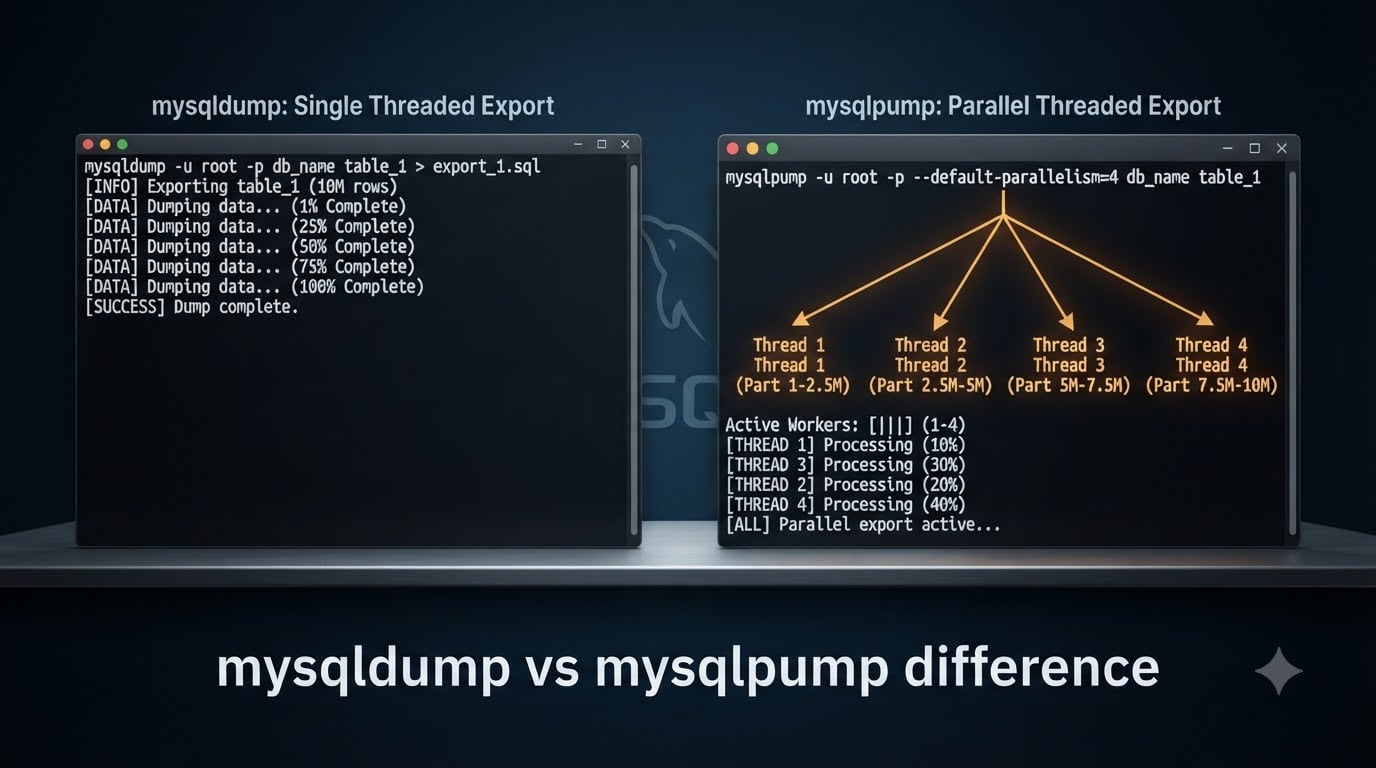
If you want the mysqldump vs mysqlpump difference in one sentence, here it is: mysqldump is MySQL’s original, single-threaded logical-backup client that ships with the server and produces a stream of SQL statements you can replay with the mysql client. mysqlpump is its multi-threaded successor that adds per-schema parallelism, built-in compression, a live progress indicator, and the ability to dump user accounts as CREATE USER / GRANT statements. mysqlpump has been deprecated as of MySQL 8.0.34, so for new work in 2026 you’ll mostly want mysqldump or the modern MySQL Shell util.dumpInstance utility.
In this guide I’ll walk you through what each tool actually does, how their performance and parallelism compare, where their option names line up and where they don’t, why Oracle deprecated mysqlpump, and a practical decision matrix you can use today. I’ve pulled the deprecation notice and option reference from the official MySQL Reference Manual and the MySQL Server Team announcement, so you can trust the version-specific details.
Table of Contents
mysqldump vs mysqlpump: at a glance
The quick answer for anyone Googling mysqldump vs mysqlpump difference: mysqldump is the long-standing, single-threaded logical-backup CLI that produces a single ordered SQL stream and remains fully supported. mysqlpump is the multi-threaded successor that can dump databases in parallel, compress output with LZ4 or ZLIB, show a live progress bar, and export user accounts — but it is now deprecated as of MySQL 8.0.34 and Oracle recommends migrating to MySQL Shell util.dumpInstance / util.loadDump.
| Capability | mysqldump | mysqlpump |
|---|---|---|
| Available since | MySQL 3.23 (very old) | MySQL 5.7.8 (2015) |
| Threading model | Single-threaded | Multi-threaded (parallel) |
| Parallel processing | No | Yes — --default-parallelism, --parallel-schemas |
| Built-in compression | No (pipe through gzip externally) | Yes — LZ4 or ZLIB via --compress-output |
| Progress indicator | No | Yes — --watch-progress |
| Dumps user accounts | No (must dump mysql system DB manually) | Yes — --users |
| Defer InnoDB secondary index | No | Yes — --defer-table-indexes |
| Output formats | SQL, XML, CSV, delimited text | SQL only |
Combine with --single-transaction | Yes (recommended) | Not supported (mutually exclusive) |
| Status in MySQL 8.0.34+ | Fully supported | Deprecated, slated for removal |
| Recommended replacement | Stay on mysqldump | MySQL Shell util.dumpInstance / util.loadDump |
If the table above tells you everything you need, stop here and run mysqldump. If you want the reasoning behind each row, keep scrolling.
What mysqldump actually does
mysqldump is the original MySQL logical-backup client and ships with every MySQL server distribution. It connects to your server over the normal client protocol, queries the data dictionary for schema metadata, then emits a single ordered text stream of CREATE TABLE, CREATE INDEX, and INSERT statements that, when piped back into the mysql client, rebuild the same database state.
Because it’s a single client thread, mysqldump is predictable: the output is one file, rows appear in deterministic order, and you can grep, less, or hand-edit it without worrying about interleaving. It supports --single-transaction for a consistent InnoDB dump, --routines, --triggers, and --events to include stored programs, plus several output formats (SQL, XML, CSV, delimited text) for tooling like csvkit or BCP-style pipelines.
The classic combination mysqldump --single-transaction --routines --triggers --events --databases mydb is the de-facto standard for small-to-medium logical backups and is what most replication setups still use for the initial seed.
What mysqlpump actually does
mysqlpump is the multi-threaded logical-backup client Oracle introduced in MySQL 5.7.8, and it works at a coarser granularity than mysqldump: it partitions the work by schema and by table chunk, then dispatches those chunks across a pool of worker threads.
That parallel architecture is the headline feature, but mysqlpump also bundles four other capabilities mysqldump doesn’t have natively:
- Built-in compression of the output stream using LZ4 or ZLIB via
--compress-output. - A live progress indicator (
--watch-progress) so you can watch dump progress on a terminal. - User-account dumping via
--users, which emitsCREATE USERandGRANTstatements so you can migrate grants without touching the `mysql` system schema. - Deferred InnoDB secondary index creation via
--defer-table-indexes, which lets the loader create indexes after the bulk INSERT to speed up restoration.
There’s one major caveat: mysqlpump’s parallel mode is incompatible with --single-transaction and --add-locks. If you need a transactional consistent snapshot on InnoDB, you can’t use --default-parallelism at the same time — the two are mutually exclusive.
Performance and parallelism
Is mysqldump single-threaded? Yes, by design. It uses one connection, one set of result-set fetches, and writes a single linear stream. On a multi-core server with a large InnoDB buffer pool, that becomes the bottleneck long before CPU or disk I/O do, which is exactly the problem mysqlpump was built to solve.
mysqlpump parallelizes the dump at two levels. The --default-parallelism=N option sets a global worker count, while --parallel-schemas=[DB][:DB]... lets you hand-tune which schemas are grouped into one worker’s queue. A typical invocation looks like:
mysqlpump --default-parallelism=4
  --compress-output=LZ4
  --watch-progress
  --users
  --databases sales inventory archive > dump.sql.lz4
Real-world speedups depend on schema layout and disk I/O. On a server with many independent schemas of similar size you’ll often see 2x-4x faster dumps; on a single huge schema where most tables are read sequentially, the gain shrinks because there isn’t enough independent work to feed the threads. Percona’s published comparison at the time of mysqlpump’s launch measured roughly 2x-3x faster on multi-schema workloads, and r/mysql users reported similar numbers.
The trade-off is that parallel dumps interleave the SQL for different tables within a schema across worker threads, so the output file is harder to grep or hand-edit. If your workflow involves opening the dump in an editor to fix one bad row, single-threaded mysqldump output is friendlier.
Compression, progress, and InnoDB tricks
Three mysqlpump-only features deserve their own callouts because they show up in almost every real-world backup script.
Built-in compression. With --compress-output=LZ4 (default) or --compress-output=ZLIB, mysqlpump compresses the dump on the client side as it writes, so you don’t have to shell out to gzip. LZ4 is faster but compresses less; ZLIB is slower but produces smaller files. With mysqldump, the equivalent is a shell pipeline like mysqldump ... | gzip > dump.sql.gz.
Progress indicator. Pass --watch-progress and mysqlpump prints a live counter of completed chunks and ETA. For a 200 GB logical backup this is enormously useful — mysqldump shows nothing, so you tail the file size with ls -lh or pv instead.
Deferred secondary index creation. With --defer-table-indexes, mysqlpump emits the CREATE TABLE statements without the secondary-index definitions, loads all the data with INSERT, and only creates the secondary indexes at the end. Because secondary-index maintenance during bulk insert is the slowest part of an InnoDB load, deferring it can dramatically shorten restore time on large tables.
User accounts and privileges
This is one of the cleanest differences between the two tools. mysqlpump can dump MySQL user accounts and their privileges as plain CREATE USER and GRANT statements using the --users flag, which makes it easy to migrate accounts from one server to another without touching the mysql system database.
mysqldump has no equivalent. To dump users with mysqldump you dump the relevant grant tables from the mysql system schema yourself — typically user, db, tables_priv, columns_priv, procs_priv, and global_grants — and reload them with mysql ... mysql < grants.sql. It works, but it’s manual and easy to forget on a fresh server.
If you’re scripting user migrations in 2026, mysqlpump’s --users was the cleanest path. After deprecation, the equivalent is the MySQL Shell util.dump-schemas / util.load-dump utilities, which can also export users.
Option compatibility: mysqldump ↔ mysqlpump
Most options carry the same name across both tools, but several don’t, and a handful exist in only one. Here is the mapping you’ll hit most often.
| Common task | mysqldump option | mysqlpump option |
|---|---|---|
| Dump named databases | --databases db1 db2 | --databases db1 db2 |
| Dump every database | --all-databases | --all-databases |
| Consistent InnoDB snapshot | --single-transaction | Not supported (parallelism breaks it) |
| Include stored routines | --routines | --routines |
| Include triggers | --triggers | --triggers (default ON) |
| Include events | --events | --events |
| Dump user accounts | No equivalent | --users |
| Parallel workers | No equivalent | --default-parallelism=N |
| Per-schema parallelism | No equivalent | --parallel-schemas=db1:db2 |
| Compress output | No equivalent (pipe gzip) | --compress-output=LZ4|ZLIB |
| Show progress | No equivalent (use pv) | --watch-progress |
| Defer InnoDB indexes | No equivalent | --defer-table-indexes |
| Exclude a database | --ignore-db=dbname | --exclude-databases=dbname |
| Exclude a table | --ignore-table=db.tbl | --exclude-tables=db.tbl |
| Replication coordinates | --source-data=1 | --source-data |
The row for --single-transaction is the one that surprises people most. If you need a transactionally consistent snapshot with mysqlpump, you have to fall back to serial mode (no --default-parallelism) and lock differently, which gives up most of the speed advantage. In that case you may as well use mysqldump.
mysqlpump deprecation and what to use instead
The MySQL Reference Manual is explicit: mysqlpump is deprecated as of MySQL 8.0.34; expect it to be removed in a future version. That banner appears at the top of the mysqlpump reference page and it’s the single most important fact to internalize before you build a new backup pipeline on top of it.
Oracle’s stated reason is that mysqlpump never reached the maturity of mysqldump — option names overlap but aren’t identical, the parallel-output format is harder to inspect, and the user-account dumping that was supposed to be a killer feature is now better served by MySQL Shell. Continued maintenance of two divergent logical-backup clients is no longer justified.
The recommended replacement is the MySQL Shell dump and load utilities:
util.dumpInstance()— full-instance logical backup, parallel, resumable, cloud-aware.util.dumpSchemas()— schema-level backup.util.loadDump()— restore, supports parallel load, progress, dry-run, and resumability.
For most production teams in 2026, the migration path is: stay on mysqldump for small scripts and replication seeds, and start using util.dumpInstance for large or long-running backups where parallelism and resumability matter.
When to use mysqldump vs mysqlpump (decision matrix)
If you’re asking should I use mysqldump or mysqlpump?, here’s the matrix I use with my team.
| Situation | Pick mysqldump | Pick mysqlpump |
|---|---|---|
| Small or medium schema (under ~50 GB) | Yes | Marginal speedup |
| Large schema, many independent databases | Slower | Yes, big win |
Need --single-transaction consistency | Yes (required) | No (incompatible) |
| Need to grep / hand-edit the dump | Yes (single stream) | Harder (interleaved) |
| Need built-in LZ4/ZLIB compression | Pipe gzip | Yes (--compress-output) |
| Need user-account migration | Manual mysql schema dump | Yes (--users) |
| Need XML / CSV output format | Yes | No (SQL only) |
| New project on MySQL 8.0.34+ | Yes (recommended) | Avoid (deprecated) |
| Already on MySQL 5.7 / 8.0 (pre-8.0.34) | Fine | Fine, but plan migration |
The short version: for almost every new project on a current MySQL version, use mysqldump. Reach for mysqlpump only if you’re pinned to an older MySQL version where it’s still useful and you specifically need parallel speed, built-in compression, or user dumping — and budget time to migrate to MySQL Shell afterwards.
Migration: from mysqlpump to mysqldump / MySQL Shell
How do I migrate from mysqlpump to mysqldump? Mechanically, the migration is mostly a one-to-one option rewrite plus dropping the parallel-only flags.
Before (mysqlpump):
mysqlpump --default-parallelism=4
  --compress-output=LZ4
  --watch-progress
  --users
  --databases sales archive > dump.sql.lz4
mysqlpump --decompress --compress-output=none dump.sql.lz4 | mysql --host=new
After (mysqldump):
mysqldump --single-transaction --routines --triggers --events
  --databases sales archive | gzip > dump.sql.gz
gunzip -c dump.sql.gz | mysql --host=new
Note what disappeared: --default-parallelism, --watch-progress, --users, and --defer-table-indexes. To recover the user-account dumping, you now dump the mysql system schema separately or — much better — move the whole workflow to MySQL Shell:
util.dumpInstance("/backups/full", { "threads": 4, "compatibility": ["strip_restricted_grants"] })
util.loadDump("/backups/full", { "threads": 4, "progressFile": "/backups/full/progress.json" })
The Shell utilities give you parallelism, resumability, and built-in user handling, which is why Oracle is steering everyone there.
Practical examples: dump, restore, dump users
Here are copy-pasteable invocations you can adapt today. Replace user, password, dbname, and hostnames as needed; pass -p without a value so the password is read from the terminal or a ~/.my.cnf option file rather than the command line.
1. Dump a single database with mysqldump.
mysqldump --single-transaction --routines --triggers --events
  -u user -p dbname > dbname.sql
2. Dump all databases with mysqldump.
mysqldump --single-transaction --routines --triggers --events
  --all-databases -u user -p > alldb.sql
3. Dump all databases with mysqlpump (parallel, compressed).
mysqlpump --default-parallelism=4 --compress-output=LZ4
  --watch-progress --all-databases -u user -p > alldb.sql.lz4
4. Dump just the user accounts with mysqlpump.
mysqlpump --users --exclude-databases=mysql --all-databases
  -u user -p > users.sql
5. Restore any of the above.
mysql -u user -p < dbname.sql
gunzip -c alldb.sql.gz | mysql -u user -p
mysqlpump --decompress --compress-output=none alldb.sql.lz4 | mysql -u user -p
Always test restores on a non-production server first. A backup you’ve never restored is a backup you don’t have.
Frequently Asked Questions
What is the difference between mysqldump and mysqlpump?
mysqldump is the original, single-threaded MySQL logical-backup client that ships with every MySQL server. mysqlpump is a newer, multi-threaded client that adds parallel processing across schemas, built-in LZ4 or ZLIB compression, a live progress indicator, and the ability to dump user accounts as CREATE USER and GRANT statements. mysqlpump has been deprecated as of MySQL 8.0.34, while mysqldump remains fully supported.
Is mysqlpump faster than mysqldump?
On multi-schema workloads with many independent databases, mysqlpump is typically 2x to 4x faster than mysqldump because u002du002ddefault-parallelism dispatches chunks to multiple worker threads. On a single large schema, the speedup shrinks because there is less parallel work to distribute, and on workloads that require u002du002dsingle-transaction consistency, mysqlpump loses most of its advantage because parallelism and single-transaction are mutually exclusive.
Why is mysqlpump deprecated?
According to the MySQL Reference Manual, mysqlpump is deprecated as of MySQL 8.0.34 and is expected to be removed in a future version. Oracle’s stated reason is that mysqlpump never reached the maturity of mysqldump, the parallel output is harder to inspect, and the features it introduced (parallelism, user dumping) are better served by the MySQL Shell util.dumpInstance and util.loadDump utilities.
Does mysqlpump support parallel processing?
Yes. mysqlpump supports parallel processing through u002du002ddefault-parallelism=N, which sets a global worker thread count, and u002du002dparallel-schemas=db1:db2, which lets you group specific databases into a single worker’s chunk. The trade-off is that parallel mode is incompatible with u002du002dsingle-transaction and u002du002dadd-locks, so you cannot combine parallel dumps with a transactionally consistent InnoDB snapshot.
Should I use mysqldump or mysqlpump?
Use mysqldump for almost all new projects on a current MySQL version, especially when you need u002du002dsingle-transaction consistency, easy-to-grep output, or XML and CSV formats. Reach for mysqlpump only if you are on MySQL 5.7 or 8.0 prior to 8.0.34 and specifically need parallel speed, built-in LZ4 or ZLIB compression, or the u002du002dusers account dump feature, and budget time afterwards to migrate to MySQL Shell util.dumpInstance.
Is mysqldump single-threaded?
Yes, mysqldump is single-threaded by design. It opens one client connection, fetches result sets sequentially, and writes one ordered SQL stream. On multi-core servers with large InnoDB schemas, this is often the bottleneck, which is exactly why Oracle added the multi-threaded mysqlpump in MySQL 5.7.8, and later recommended MySQL Shell util.dumpInstance for parallel logical backups.
What replaced mysqlpump?
The recommended replacement for mysqlpump is the MySQL Shell dump and load utilities: util.dumpInstance() for whole-instance backups, util.dumpSchemas() for schema-level backups, and util.loadDump() for restoration. They offer parallelism, resumability, progress reporting, and cloud-aware output that mysqlpump was never extended to provide.
Can mysqldump backup user accounts?
Not natively. mysqldump does not have a u002du002dusers equivalent, so to back up MySQL user accounts you have to dump the relevant grant tables from the mysql system schema manually (user, db, tables_priv, columns_priv, procs_priv, global_grants) and reload them with the mysql client. mysqlpump’s u002du002dusers flag handled this directly, and MySQL Shell util.dumpInstance can also export user accounts.
Final thoughts on the mysqldump vs mysqlpump difference
To wrap up the mysqldump vs mysqlpump difference: mysqldump is the conservative, single-threaded workhorse that hasn’t changed in years and still ships with every MySQL version. mysqlpump was Oracle’s 2015 answer to multi-core servers, adding parallel dumping, built-in LZ4/ZLIB compression, a progress indicator, and user-account dumping — useful features that have now been folded into MySQL Shell.
For 2026 and beyond, my recommendation is straightforward. Use mysqldump as your default logical-backup tool, especially when consistency, portability, and grep-friendly output matter. If you’re starting a new project on MySQL 8.0.34 or later, skip mysqlpump entirely and build directly on MySQL Shell’s util.dumpInstance and util.loadDump. Reserve mysqlpump for the legacy scripts pinned to older MySQL versions, and plan a migration path off it before the binary disappears.
Whichever tool you pick, automate the restore test. The fastest dump in the world is worthless if the restore fails silently at 3 a.m.